Restyle an image you already have Image to image
Hand the studio a picture you already have and let a model repaint it. How far it may wander is one slider.
The same tutorial, three subjects
Source image
1 · Attach the starting image
starts from a picture instead of from noise, so the first thing it needs is the picture.Open and put yours into it. The upload tile appears once you have chosen a Source mode, and any finished image in your results can be sent here from its own menu.The example started from the text-to-image result: the same subject, at 1024×1024. The picture is yours to attach; nothing on this step comes from the example. - Source image
2 · Set the mode to img2img
Under Source mode, choose how the picture you attached should be used.img2img repaints the whole frame: the model reads your picture, then draws over all of it.The other modes read it for structure, patch a part of it, or blend it with others instead. - Source image
3 · Set the denoising strength
decides how much of your picture the model may change. - Near 0, almost nothing changes.
- Near 1, almost nothing of your picture survives, and you may as well have started from noise.
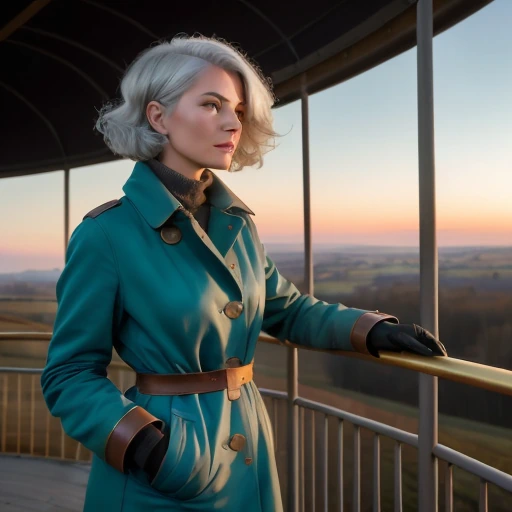
Denoising strength 0.15 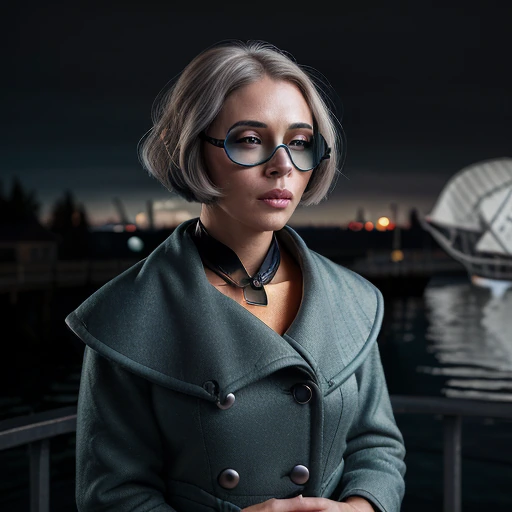
Denoising strength 1 Prompt
4 · Prompt for what it should become
Describe the picture you want out, not the one you put in.This example kept the subject's description word for word and changed only the weather and the light, asking for: The negative prompt was:a woman in her 30s with a sleek silver bob haircut, round copper goggles resting up in her silver hair, a patched teal canvas coat, a small brass compass on a cord around her neck, standing at the wooden railing of a zeppelin airship's open gondola deck in a night storm, lantern light on wet brass fittings, rain streaking past the taut rigging, the dark canvas envelope of the airship overhead, a lit thunderhead below the deck, cinematic lighting, rich detail, professional photography, high dynamic rangeCompare the result with the source. At 0.7 the model can only change so much, so what changes is the weather and the light. The subject and the composition stay. Raising the strength allows more change, and that change reaches the subject as readily as the sky.lowres, blurry, deformed, extra limbs, watermark, text, jpeg artifacts, ocean, sea, water surface, sailing ship, boat, cruise ship, sunglassesModel & style
5 · Match the model and size to the source
Keep the model the source was made with, and the size it was made at.This example used AlbedoBase XL (SDXL) at 1024×1024, which is the size of the source image. Ask for a different shape and the model squashes what it is painting over.The model and the dimensions are set together, because here the size follows the picture rather than being a choice.Sampling is unchanged from the text-to-image example: k_euler_a, 30 steps, guidance 7.5, seed 1234567890. 6 · Send it to the horde
That is the whole request.Press Generate. Your picture is uploaded inside the request itself, along with everything else.The job then queues for a volunteer worker like any other. Expect anything from a few seconds to a few minutes. This run took about 25 seconds.
Where next
You can now take a picture and change its weather, its light or its style while keeping what you liked. When only one part of a picture is wrong, repainting all of it is the wrong tool: inpainting changes the part you paint over and leaves the rest untouched.